
EVERY DETAIL, RIGHT THERE.
Talk to the seller. NotedRE takes the notes.
NotedRE writes your seller notes automatically while you talk, so you can focus on the conversation instead of typing and digging back through them. A Mac app for real estate investors, wholesalers and acquisition reps.
14-day free trial · 5 call-hours · no card · Mac only (macOS)
A seller says they are relocating and need to sell quickly, would take $185,000, owe about $90,000, and describe a leaking roof and broken kitchen cabinets, give two reasons for selling, and mention working nights and a stone fireplace. NotedRE fills these into notes, including the other details, while ignoring the rep's own pitch.
Stop typing. Start listening.
Every seller call has two jobs: build the relationship and capture the details. Doing both at once means you do both worse.
- Typing while the seller is still talking
- “Sorry, what was the asking price again?”
- Scrolling back through scribbles to find the roof comment
- Rewriting notes after the call
- Eyes and ears on the seller, hands off the keyboard
- Motivation, price, owed, timeline and other details fill in on their own
- Every fact points back to the exact words said
- Notes are done when the call is done
How it works
- 1
Take the call
iPhone calls routed through your Mac, or any call audio on the Mac. Hit Start Call, or let the panel sit ready with Cmd+J.
- 2
Keep talking
The notes fill in live: every reason to sell, asking price, amount owed, timeline, repairs, updates, red flags and other notes.
- 3
Copy and go
One-click Copy to your CRM, a seller-safe comp report, and a recap saved in Past Calls.
Built around how a seller call actually goes
Filled in as they talk
Motivation with a hot, warm or cold score from 1 to 10. Asking price, amount owed and timeline. Plus repairs needed, updates already done and red flags, all captured while you stay in the conversation.
- Hot / warm / cold motivation score
- Asking price, owed, timeline
- Repairs, updates and red flags
- Written as plain facts, no “Seller says…” filler
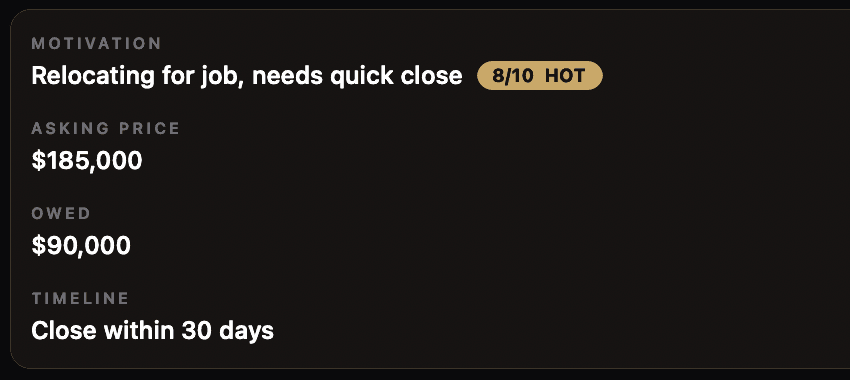
Only the seller’s words become facts
Your pitch (“we fix and flip”, your offer numbers) never becomes a seller fact. NotedRE also tells real motivation apart from passing remarks, so “I’m sick today” isn’t logged as a reason to sell.
Every fact has receipts
Each fact carries a “said at 02:14” chip that shows the seller’s exact words. Anything the seller didn’t clearly say is dimmed and marked with a “?” instead of being stated as fact.
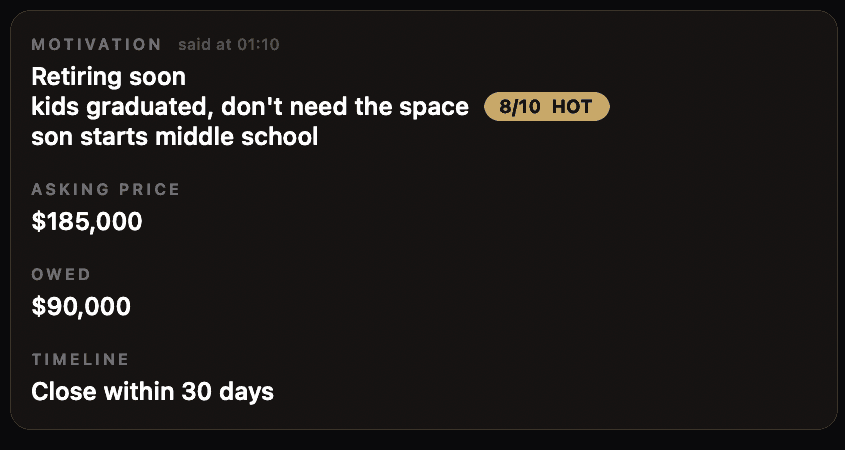
Every reason, kept
Sellers rarely give just one reason. Motivation lists every reason they give, one per line, and earlier reasons never disappear when new ones come up. A seller who says they’re “not forced to sell” or “in no rush” gets a cold score, so a lukewarm lead doesn’t look hot.
- One reason per line
- Earlier reasons stay
- “No rush” reads as cold
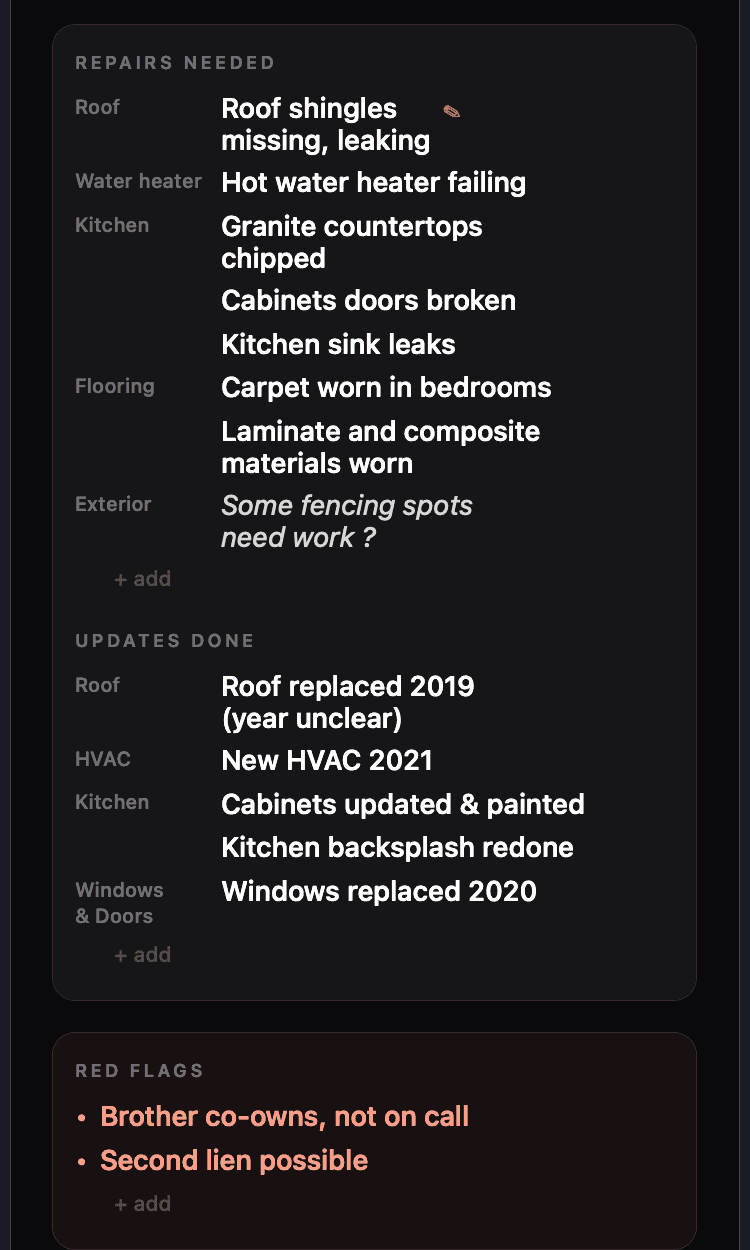
Grouped by area, with cost estimates
Repairs and updates are grouped under Roof, Kitchen, HVAC, Flooring and more. Repair cost estimates only count clear, real repairs, adjusted for your state with a contingency added. Unsure items stay out of the math.
- Grouped by area
- State-adjusted estimates plus contingency
- Red flags kept separate and visible
The details that aren’t repairs
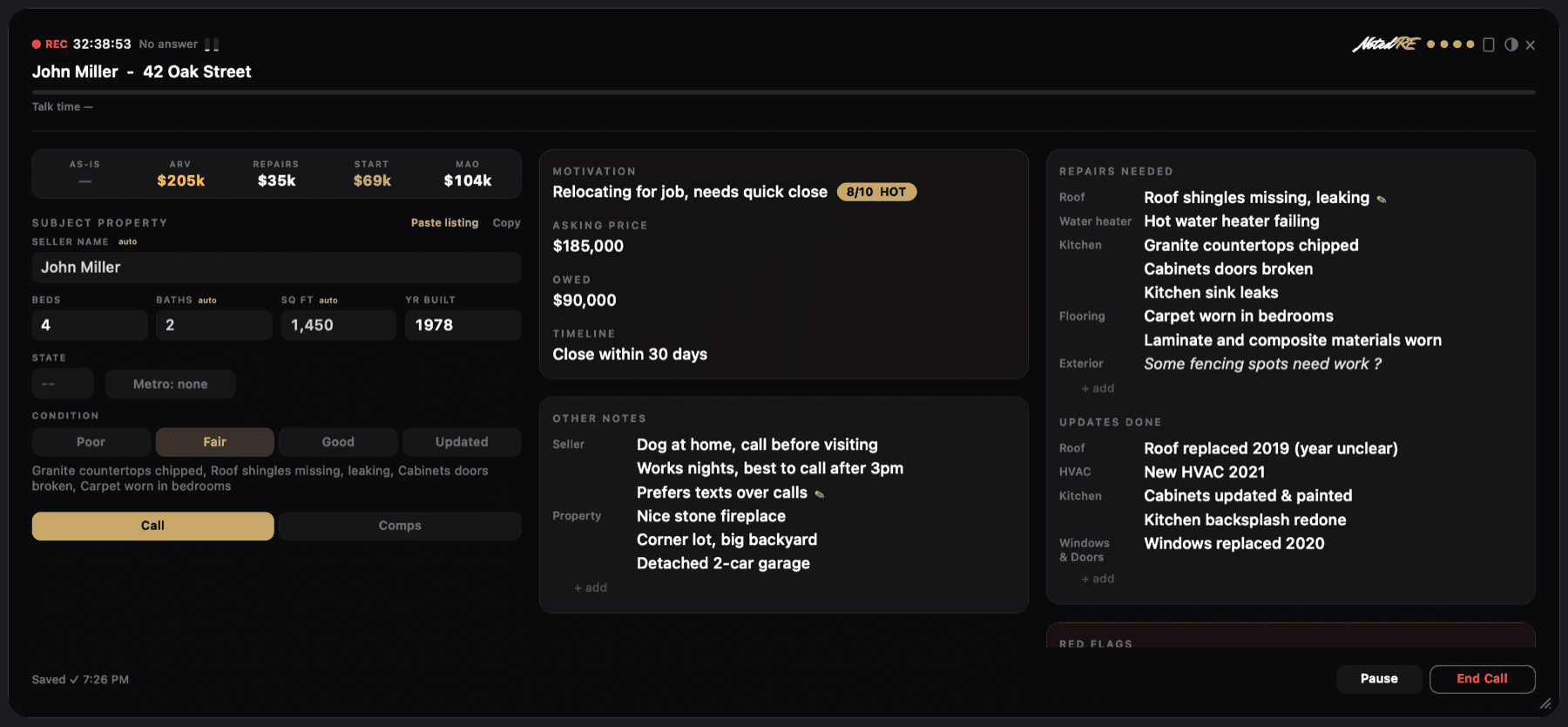
Not everything a seller says is a repair or an update. Other Notes catches the rest in two groups: the seller’s personal situation (“Works nights, best to call after 3pm”) and the property’s features (“Nice stone fireplace”). They stay out of the seller-facing comp report for privacy.
- Seller: situation and call preferences
- Property: features worth remembering
- Never shown in the comp report
Tall or wide, any size you like
Keep the panel tall at the side, or switch to the wide layout with one click. Wide runs three columns sideways, so it fits along the top or bottom of your screen: deal and property, then seller and other notes, then repairs, updates and red flags. Drag the corner to any width and height in either layout. NotedRE remembers your size.
One click flips between tall and wide. Drag the corner to any size. Text size is separate: Cmd +/-.
Objection cards and a talk-time meter
When a seller pushes back, an objection card shows up with a suggested reply. A talk-time meter shows who’s doing the talking, so you can keep the seller doing most of it.
“That’s lower than I was hoping for.”
I hear you. What number did you have in mind, and what is it based on?
ExampleComps to offer math
Paste a Zillow or Redfin listing and NotedRE reads it for you (no scraping). Get as-is value, ARV, repairs, a starting offer and your MAO, with your own ARV percent and fees.
- Paste a listing, nothing is scraped
- As-is value and ARV from comps
- Starting offer and MAO
Hands-on shortcuts, no fumbling
Made for reps who live on the phone. Show or hide the panel, pause while you update your CRM, and log a no-answer without leaving the keyboard.
- Calls under 20 seconds aren’t saved.
- 15 minutes of silence auto-ends and saves the call.
Seller-safe comp report
One click makes a PDF with comps and repairs, no offer math and none of your private notes, ready to share with the seller.
One-click Copy
Copy any section straight into your CRM. NotedRE sits beside your dialer and CRM.
Learns from you
Your corrections and thumbs up or down teach it your style. You can view, edit and delete what it learned.
Past Calls
Every saved call, with a recap, so you never dig back through notes.
Your audio stays on your Mac
Audio is transcribed on your Mac and never saved. Only the text transcript goes to the AI to write your notes.
Simple pricing, one call-hour at a time
Start with a free trial. No card needed.
Solo
For investors taking their own calls.
- 40 call-hours every month
- Live notes, comps, offer math
- Seller-safe comp report PDF
- Past Calls with recaps
- Extra hours: $10 per 10
Founding
Solo features at a price locked for life. First 100 members only.
- 40 call-hours every month
- Live notes, comps, offer math
- Seller-safe comp report PDF
- Past Calls with recaps
- Extra hours: $10 per 10
Pro
For full-time acquisition reps.
- 100 call-hours every month
- Live notes, comps, offer math
- Seller-safe comp report PDF
- Past Calls with recaps
- Extra hours: $10 per 10
14-day free trial. 5 call-hours included, no card needed. Mac only (macOS).
Questions
Does it record my calls?
No audio is saved. Audio is transcribed on your Mac and never stored. Only the text transcript is sent to the AI to write your notes.
Does it work with my iPhone?
Yes. If your iPhone calls are routed through your Mac, NotedRE picks up the call audio there. It also works with any call audio playing on the Mac.
Does it work with my dialer or CRM?
It sits beside them. Keep dialing the way you do now, and use the one-click Copy button to drop any section of your notes into your CRM.
Is it legal to transcribe calls?
Laws vary by state, and some states require all-party consent to record or transcribe a call. Check the rules where you and your sellers are, and let callers know where required. This isn't legal advice.
Can I make the panel bigger, smaller or wider?
Yes. Drag the corner to any width and height, in the tall or the wide layout, and NotedRE remembers your size. Text size is separate: use Cmd + and Cmd - to change it.
Does it work on Windows?
Not yet. NotedRE is Mac only (macOS) for now.
What counts as a call-hour?
Time on an active call. When you pause with Control+P, no call time is counted and no AI runs. Calls under 20 seconds aren't saved, and 15 minutes of silence ends and saves the call. Need more? Extra hours are $10 per 10.
Take the next seller call without taking notes.
Start free trial14-day free trial · no card · Mac only (macOS)